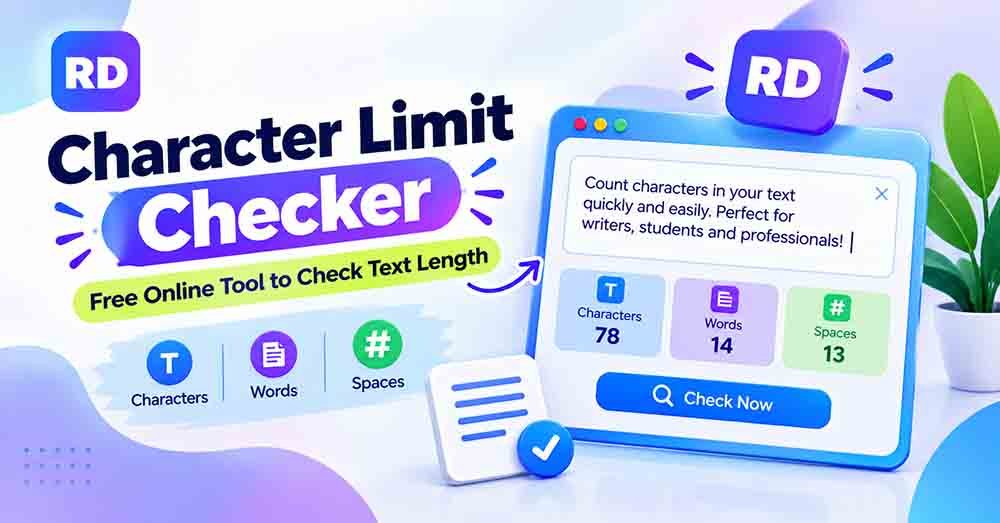
A character limit checker helps you count the total characters in a word, sentence, paragraph, or complete text. It is useful when writing social media posts, SEO titles, meta descriptions, product descriptions, emails, and online forms that have a character limit.
If your text is too long, you may need to remove extra words before publishing it. Instead of counting every letter manually, you can use a free online character counter tool to check your text length in seconds.
In this guide, you will learn how character limits work, how to count characters manually, how to check text length online, and how to keep your writing within a required limit.
What Is a Character Limit Checker?
A character limit checker is an online tool that counts the characters in your text. It helps you understand how long your writing is and whether it meets a specific text limit.
A character can include:
- Letters: A, B, C, and other alphabet letters.
- Numbers: 1, 2, 3, and other digits.
- Spaces: Gaps between words.
- Punctuation: Full stops, commas, question marks, and exclamation marks.
- Symbols: @, #, $, %, and other special signs.
- Emojis: Some emojis may contain multiple text elements.
For example, the sentence “Hello World!” contains 12 characters.
| Text | Character Count |
|---|---|
| Hello | 5 |
| Space | 1 |
| World | 5 |
| Exclamation mark (!) | 1 |
| Total | 12 |
The tool counts these elements automatically, so you do not have to calculate everything yourself.
Why Do You Need a Character Limit Checker?
Many websites and online platforms have limits for the amount of text you can enter. Checking your text before publishing helps you avoid errors and unnecessary editing.
Here are some common uses:
1. Social Media Posts
Social media platforms may have limits for posts, captions, comments, and profile descriptions. A quick character check helps you prepare content that fits the required space.
If you regularly write social media content, read our guide on how to count characters for social media posts.
2. SEO Titles and Meta Descriptions
SEO writers use character counting to review page titles and meta descriptions. Keeping them within recommended lengths can help make search snippets clear and easy to read.
There is no single fixed display length for every search result because search engines may shorten titles and descriptions depending on the device and search query. However, checking the character count is still a useful part of SEO writing.
3. Online Forms
Some websites limit the number of characters in feedback boxes, application forms, and message fields. Checking the length before submitting your information can save time.
4. SMS and Text Messages
Text messages can have length limits depending on the service and character encoding. Some special symbols may also affect how a message is divided into multiple parts.
5. Product Titles and Descriptions
Online stores may have recommended or required text lengths for product names and descriptions. Checking the total helps you write clear information without exceeding the available space.
How to Use a Character Limit Checker Online
You do not need to install software or have technical knowledge to count your text online.
Follow these simple steps:
- Open the online tool: Visit a character counting website.
- Enter your text: Type your words or paste your paragraph into the text box.
- Check the result: Review the total number of characters displayed.
- Compare the limit: Check whether your text is within the required number.
- Edit your text: Remove unnecessary words if your writing is too long.
- Check again: Paste the updated text to see the new total.
An online character limit checker makes the process simple because it updates the count without requiring manual calculations.
You can also learn more about using an online character counter for different types of writing.
How to Calculate Character Count Manually
You can calculate the number of characters yourself by counting each part of your text. This method is useful for short sentences and simple examples.
Step 1: Count the Letters
Every letter counts as one character.
Example:
Text: Cat
- C = 1
- a = 1
- t = 1
Total: 3 characters
Step 2: Count the Spaces
When spaces are included, every gap between words adds one character.
Example:
Text: I like tea
- I = 1
- Space = 1
- like = 4
- Space = 1
- tea = 3
Total: 10 characters
Step 3: Count Numbers and Symbols
Numbers and punctuation marks also add to the character count.
Example:
Text: Hello123!
- Hello = 5
- 123 = 3
- ! = 1
Total: 9 characters
Step 4: Add All Characters Together
Add the letters, spaces, numbers, and punctuation marks to calculate the complete total.
Example:
Text: I love design.
- Letters = 11
- Spaces = 2
- Full stop = 1
Total: 14 characters
Manual counting is useful for small amounts of text, but it can take more time when you have a long paragraph. A character limit checker can calculate the total much faster.
Character Count Examples
These examples show how different sentences are counted when spaces and punctuation are included.
| Example Text | Letters | Spaces | Punctuation | Total |
|---|---|---|---|---|
| Hello | 5 | 0 | 0 | 5 |
| Hello World | 10 | 1 | 0 | 11 |
| Hello World! | 10 | 1 | 1 | 12 |
| Good morning | 11 | 1 | 0 | 12 |
| I like tea | 8 | 2 | 0 | 10 |
| Count my text! | 11 | 2 | 1 | 14 |
| Hello123! | 5 | 0 | 1 | 9 |
| I love design. | 11 | 2 | 1 | 14 |
The total may change if you choose to exclude spaces or use a different method for counting special characters.
Character Count With Spaces and Without Spaces
There are two common ways to measure text length: including spaces and excluding spaces.
For example:
Text: I love tea
- Including spaces: 10 characters
- Without spaces: 8 characters
When spaces are included, every gap between words adds one character. When spaces are excluded, only the other characters are counted.
Different platforms may use different counting rules. Always check which method is required before submitting your text.
Read our detailed guide on how to count characters with and without spaces to understand the difference.
Character Count vs. Word Count
Character count and word count are not the same. Both are useful for writing, but they measure different things.
For example:
Text: I love graphic design.
- Word count: 4
- Character count: 23, including spaces and the full stop.
| Feature | Character Count | Word Count |
|---|---|---|
| Measures | Individual characters | Complete words |
| Counts spaces | Yes, when included | No separate word |
| Counts punctuation | Yes | Usually not separate words |
| Best for | Text limits and short descriptions | Articles and long content |
If you are unsure which measurement you need, read our guide to word count vs. character count.
Tips to Stay Within a Character Limit
If your writing is longer than the allowed limit, you can make a few changes without losing its main meaning.
Use Shorter Words
Replace long phrases with shorter alternatives when the meaning remains clear.
Remove Extra Words
Remove repeated information and unnecessary descriptions. Keep only the words that help explain your message.
Write Clear Sentences
Short and direct sentences are often easier to understand. Avoid adding extra details that do not support your main point.
Keep Important Information
Do not remove useful details just to reduce the count. Focus on making your writing shorter while keeping its meaning.
Check the Text Again
After editing, use a character limit checker to review the new total. This helps you confirm that your text fits the required limit.
Benefits of Using an Online Character Counter
An online tool can make writing and editing much easier, especially when you work with text every day.
Some useful benefits include:
- Quick results: Check your text length in seconds.
- Less manual work: Avoid counting every letter and space.
- Easy editing: Make changes and review the new count.
- Multiple uses: Check captions, titles, descriptions, messages, and paragraphs.
- Simple access: Use the tool directly in your browser.
- Better accuracy: Reduce mistakes that can happen during manual counting.
You can use our online character count tool to measure text for different writing tasks.
You may also find these guides useful: character counter with spaces and character counter without spaces.
Frequently Asked Questions (FAQs)
1. What is a character limit checker?
A character limit checker is an online tool that counts the characters in your text. It helps you see whether your writing is within a required limit.
2. How do I check the character count of my text?
Copy your text, paste it into an online character counting tool, and review the total displayed on the screen.
3. Do spaces count as characters?
Yes. Spaces count as characters when the tool includes them in the total. Some tools also show a separate count without spaces.
4. What is the difference between character count and word count?
Character count measures individual text characters, such as letters, spaces, and punctuation. Word count measures the number of words in your writing.
5. Can I count characters in a long paragraph?
Yes. You can paste a long paragraph into an online tool to calculate its character count. Check whether the tool has any input-size restrictions.
6. Does punctuation count as a character?
Yes. Common punctuation marks such as commas, full stops, question marks, and exclamation marks are counted as characters.
7. Do emojis count as one character?
Not always. Some emojis contain multiple Unicode code points or combined elements. Different tools and platforms may count them differently.
8. Can I use a character counter for SEO?
Yes. It can help you check SEO titles, meta descriptions, headings, and other website text. It is a useful way to review text length before publishing.
9. Is an online character counter free?
Many online character counting tools are free to use. You can check your text without installing additional software.
Conclusion
Checking text length is important when writing social media posts, SEO titles, product descriptions, online forms, and short messages. Counting every character manually can take time, especially when working with long paragraphs.
A character limit checker makes this task faster and easier. It helps you review letters, numbers, spaces, punctuation, and symbols so you can prepare text that fits your required limit.
Instead of counting everything by hand, try our free online character counter tool and check your text length in seconds.
For more information about how computers handle special characters and combined letters, visit the official Unicode guide to combining characters.