Creating a strong password is one of the simplest ways to protect your online accounts. However, many people still use short passwords or repeat them across multiple websites. These habits can expose personal information, financial accounts, and private data to security risks.
A reliable password generator makes this process easier. It creates unpredictable passwords using different combinations of letters, numbers, and special characters. Instead of thinking of complicated passwords yourself, you can generate a new one within seconds.
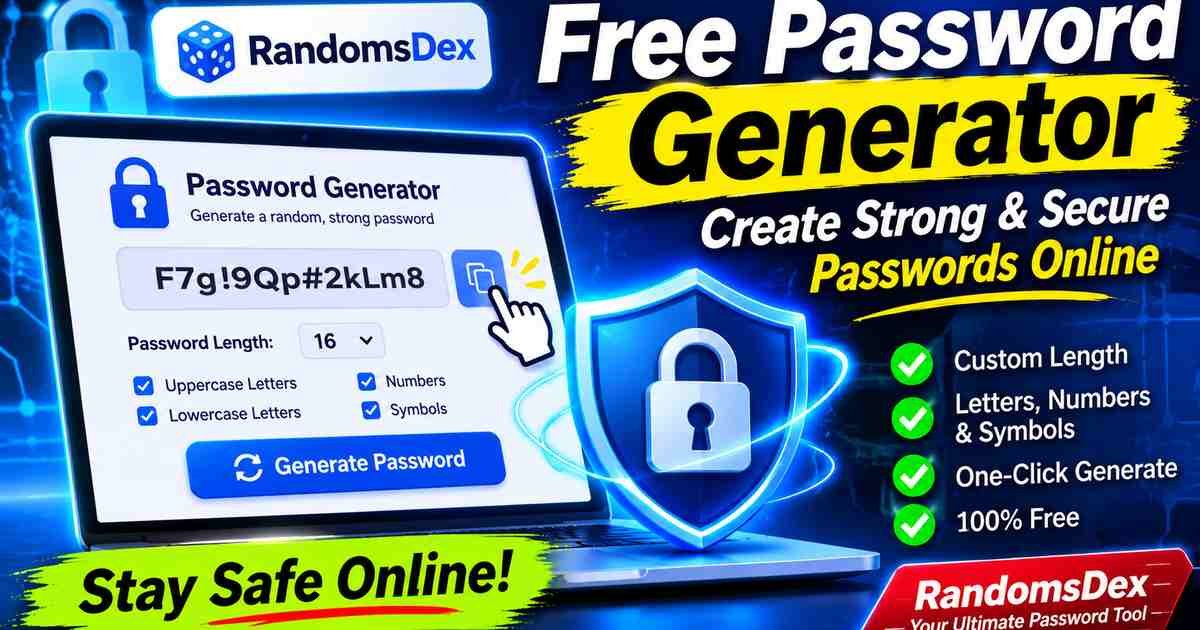
The RandomsDex Password Generator helps you create customized passwords directly in your browser. You can choose the password length and select the character types you need. The tool supports passwords between 8 and 64 characters.
Whether you need a random password for social media, email, online banking, Wi-Fi, or business accounts, this free online tool provides a convenient starting point.
Table of Contents
- What Is a Password Generator?
- Try Our Free Password Generator
- How Does a Random Password Generator Work?
- Features of the RandomsDex Password Generator
- Types of Passwords You Can Generate
- How to Create a Strong Password
- How Long Should a Password Be?
- Password Strength Calculation
- Password Entropy Explained
- Why Random Passwords Are More Secure
- Password Generator With Symbols vs Without Symbols
- Common Password Security Mistakes
- Are Online Password Generators Safe?
- Password Generator vs Password Manager
- Who Should Use a Password Generator?
- Frequently Asked Questions
- Final Thoughts
What Is a Password Generator?
A password generator is an online tool that automatically creates random passwords. It uses selected character groups to produce combinations that are difficult to predict. These combinations can include uppercase letters, lowercase letters, numbers, and special symbols.
A good random password generator saves time and reduces dependence on familiar words. People often create passwords using birthdays, names, favorite places, or simple number patterns. Unfortunately, these choices can be easier to guess.
A strong password generator provides more flexibility. You can choose a suitable length and customize the characters included in the result. This makes it useful for different websites and account requirements.
For example, a banking website might accept a long password containing letters, numbers, and symbols. Another service might restrict certain special characters. A customizable password generator helps you create passwords that match these requirements.
Try Our Free Password Generator
The RandomsDex Free Password Generator lets you create random passwords without creating an account.
The tool generates passwords locally in your browser. Your generated password is not transmitted to a remote server.
You can select the password length from 8 to 64 characters. You can also choose uppercase letters, lowercase letters, numbers, and symbols.
The generator guarantees at least one character from each selected character group. It also excludes commonly confused characters to make passwords easier to read.
Why use RandomsDex?
- Free password generation without registration.
- Custom password lengths from 8 to 64 characters.
- Uppercase and lowercase character options.
- Numbers and special symbol options.
- One-click password generation.
- Convenient copy functionality.
- Browser-based password generation.
- No account or subscription required.
Generate a new password whenever you need one. Remember to save it in a reputable password manager.
How Does a Random Password Generator Work?
A random password generator creates combinations from selected character groups. These groups determine which characters can appear in the final password.
For example, uppercase letters contain 26 possible characters. Lowercase letters contain another 26 characters. Numbers provide 10 additional choices.
Special symbols increase the available character pool further. Combining these groups creates many possible password combinations.
Step 1: Select Password Length
Choose how many characters your password should contain. RandomsDex supports lengths between 8 and 64 characters.
Longer passwords generally provide a larger combination space when generated randomly.
Step 2: Choose Character Types
Select the character groups you want to include.
- Uppercase letters: A–Z
- Lowercase letters: a–z
- Numbers: 0–9
- Special symbols: Supported punctuation and symbols
Step 3: Generate a Password
Click the Generate Password button. The tool creates a new password using your selected settings.
Step 4: Copy Your Password
Use the Copy button to copy the generated password. Then paste it into your account’s password field.
Store the password securely instead of keeping it in an ordinary text document.
Features of the RandomsDex Password Generator
A useful online password generator should offer customization and convenience. RandomsDex combines several practical features in one interface.
Custom Password Length
Password length is an important part of password security. RandomsDex allows users to choose lengths from 8 to 64 characters.
You can generate a 12-character password for a website with basic requirements. You can also generate longer passwords for important accounts.
Uppercase and Lowercase Letters
Uppercase and lowercase letters provide additional character choices. They help create more varied password combinations.
For example, a password can contain both capital and small letters instead of using one consistent format.
Numbers and Special Symbols
Numbers and symbols add more possible character combinations. They also help satisfy the requirements of websites that support these character types.
You can enable or disable these options according to your needs.
Easy Copy Function
Copying a generated password manually can introduce mistakes. The copy function makes it easier to transfer the password accurately.
Always confirm that the destination website accepts the generated password before completing registration.
Browser-Based Generation
RandomsDex creates passwords directly in your browser. According to the tool’s privacy information, generated passwords are not sent to a remote server.
This is useful for people who prefer generating passwords without submitting them to an external service.
No Registration Required
You do not need to create an account to use the generator. Open the page, select your settings, and generate a password.
Types of Passwords You Can Generate
Different websites have different password requirements. A customizable password generator helps users create suitable combinations.
Random Password Generator
A random password generator creates unpredictable combinations of selected characters.
It is useful for email accounts, shopping websites, social media, and other online services.
Strong Password Generator
A strong password generator focuses on creating long and unpredictable passwords.
Length and randomness are important factors. Avoid using familiar words or personal information in your passwords.
Password Generator With Symbols
A password generator with symbols includes special characters in the generated result.
Examples include punctuation marks and other supported symbols.
This option is useful when a website requires special characters in account passwords.
Password Generator Without Symbols
Some websites restrict certain special characters. A password generator without symbols can help create passwords containing only selected letters and numbers.
This option can also reduce typing difficulties on devices with different keyboard layouts.
16 Character Password Generator
A 16 character password generator creates passwords containing exactly 16 characters.
This length provides a useful starting point for many online accounts. However, actual security also depends on randomness and the character selection process.
20 Character Password Generator
A 20 character password generator creates longer combinations for users who want additional flexibility.
Long passwords are particularly convenient when stored in a password manager.
32 Character Password Generator
A 32 character password generator creates extended random passwords.
These passwords can be useful for important accounts, technical applications, and services that accept longer credentials.
64 Character Password Generator
A 64 character password generator creates passwords using the maximum length supported by RandomsDex.
Longer passwords provide more possible combinations when generated uniformly from a suitable character pool.
Always check the password length supported by the website where you plan to use it.
How to Create a Strong Password
Creating a secure password involves more than adding random numbers to a familiar word.
Follow these practical recommendations.
Use Sufficient Password Length
Long passwords generally provide more protection against guessing attacks. For important accounts, consider using a password of at least 15 characters.
NIST guidance distinguishes between single-factor and multifactor authentication requirements. Its current digital identity guidance specifies a minimum of 15 characters for single-factor passwords.
Avoid Personal Information
Never build important passwords around easily available information.
Avoid using:
- Your full name.
- Birthdays and anniversaries.
- Phone numbers.
- Common dictionary words.
- Simple keyboard patterns.
- Names of family members.
Create Unique Passwords
Use a different password for every important account.
If one website experiences a data breach, attackers may try those credentials elsewhere. Unique passwords help reduce the impact of credential reuse.
Use a Password Manager
A password manager can store your generated passwords securely.
You do not need to memorize every complicated combination. Instead, you can protect your password vault with a strong master password and multifactor authentication.
Enable Multifactor Authentication
Multifactor authentication adds another verification step during login.
Even when someone discovers your password, additional authentication can make unauthorized access more difficult.
How Long Should a Password Be?
The ideal password length depends on the account, authentication method, and website requirements.
Here is a practical comparison of different password lengths.
| Password Length | General Use |
|---|---|
| 8 characters | Short minimum for certain MFA-protected accounts |
| 12 characters | Better than short passwords, but not ideal for every important account |
| 15 characters | NIST single-factor minimum |
| 16 characters | Practical longer-password option |
| 20 characters | Useful for important accounts |
| 32 characters | Extended random password |
| 64 characters | Maximum supported by RandomsDex |
These are practical examples, not universal guarantees of security.
A random 16-character password can be much harder to guess than a predictable 20-character password.
The quality of randomness matters alongside length.
Password Strength Calculation
Understanding password combinations helps explain why random passwords can be difficult to guess.
A password’s theoretical combination count depends on its character pool and length.
The basic formula is:
Total Possible Combinations = Character Pool Size ^ Password Length
For example, consider a password containing uppercase letters, lowercase letters, and numbers.
- Uppercase letters: 26
- Lowercase letters: 26
- Numbers: 10
- Total character pool: 62
For a 16-character password:
62^16 = approximately 47,672,401,706,823,533,450,263,330,816 possible combinations.
This represents approximately 4.77 × 10²⁸ combinations.
Password Entropy Calculation
Password entropy measures the theoretical uncertainty of a randomly generated password.
The simplified formula is:
Entropy = Password Length × log₂(Character Pool Size)
For a 16-character password using 62 possible characters:
16 × log₂(62) = approximately 95.27 bits.
For a 20-character password using the same character pool:
20 × log₂(62) = approximately 119.08 bits.
| Password Length | Character Pool | Approximate Entropy |
|---|---|---|
| 8 | 62 | 47.63 bits |
| 12 | 62 | 71.45 bits |
| 16 | 62 | 95.27 bits |
| 20 | 62 | 119.08 bits |
| 32 | 62 | 190.54 bits |
| 64 | 62 | 381.08 bits |
These figures assume uniformly random character selection. They are theoretical estimates, not guaranteed cracking times.
Actual security depends on the random generation method, implementation, password storage, and attack conditions.
Why Random Passwords Are More Secure
People naturally create patterns when choosing passwords. They often use familiar words, repeated numbers, or predictable character substitutions.
Attackers understand these habits. Password guessing tools can test common words, previously leaked passwords, and predictable variations.
A properly implemented random password generator avoids relying on personal habits.
It selects characters from a defined pool using a secure random process. This makes the resulting password less predictable than an ordinary human-created password.
Random passwords also help prevent credential reuse. Every account can receive a separate password instead of sharing one familiar combination.
However, no password generator can protect an account against every threat. Phishing, malware, stolen devices, and compromised websites can still expose credentials.
Password Generator With Symbols vs Without Symbols
Both password types have practical uses.
The best choice depends on the website’s password requirements and the character pool available.
| Feature | With Symbols | Without Symbols |
|---|---|---|
| Special characters | Included | Excluded |
| Character pool | Larger | Smaller |
| Website compatibility | Depends on allowed symbols | Often convenient |
| Typing convenience | May require extra keyboard access | Generally simpler |
| Customization | High | High |
A larger character pool can increase theoretical combinations for passwords of equal length.
However, length and secure randomness remain important.
Do not assume that every website accepts every special character. Check the destination website’s password policy before using your generated password.
Common Password Security Mistakes
Even a good password generator cannot solve every security problem. Users should avoid common mistakes when creating and storing passwords.
Reusing the Same Password
Using one password across multiple websites increases security risks.
A breach on one service may expose credentials used elsewhere.
Choosing Short Passwords
Short passwords generally have fewer possible combinations.
Longer randomly generated passwords provide a larger theoretical search space.
Using Predictable Patterns
Patterns such as consecutive numbers and common words can be easier to guess.
Avoid simple variations of familiar passwords.
Saving Passwords in Unprotected Files
Ordinary notes and unencrypted documents may expose passwords to other people.
Use a reputable password manager instead.
Ignoring Multifactor Authentication
A password alone is not always sufficient protection.
Enable multifactor authentication wherever possible, especially for email and financial accounts.
Are Online Password Generators Safe?
Online password generators can be useful, but their security depends on implementation and privacy practices.
Before using any generator, consider these factors:
- Does it generate passwords locally?
- Does it use a cryptographically secure random source?
- Does it transmit generated passwords?
- Does it store generated passwords?
- Does it provide clear privacy information?
- Does it allow sufficient password lengths?
RandomsDex states that passwords are generated locally in your browser and are never transmitted to its servers.
For stronger technical assurance, a generator should use the browser’s cryptographically secure random number functionality. A secure implementation should also avoid biased character selection.
Remember that local generation does not automatically protect against malware, malicious browser extensions, or compromised devices.
For highly sensitive accounts, review the security practices of the tool and consider using a trusted password manager.
Password Generator vs Password Manager
These tools serve related but different purposes.
A password generator creates new password combinations. A password manager stores and organizes passwords for future use.
| Feature | Password Generator | Password Manager |
|---|---|---|
| Creates random passwords | Yes | Often |
| Stores passwords | Not necessarily | Yes |
| Organizes accounts | No | Yes |
| Autofill | Usually no | Often |
| Password generation settings | Varies | Varies |
| Main purpose | Create passwords | Store and manage credentials |
RandomsDex is designed for convenient password generation.
If you need long-term password storage, combine the generator with a reputable password manager.
Who Should Use a Password Generator?
A free password generator can help different types of users.
Students
Students use online accounts for learning platforms, email, research, and educational services.
Unique passwords can help protect these accounts.
Business Owners
Business owners often manage multiple platforms and services.
Using unique passwords helps reduce the risks associated with compromised accounts.
Developers
Developers may need random credentials for testing environments and supported applications.
However, production secrets, API keys, and access tokens should follow dedicated secrets-management practices.
Everyday Internet Users
Anyone creating online accounts can benefit from random password generation.
It removes the need to invent a new password manually every time.
Frequently Asked Questions (FAQs)
1. What is the best free password generator?
A good free password generator should offer customization, sufficient password length, and secure random generation.
RandomsDex provides free browser-based password generation with customizable character options and lengths between 8 and 64 characters.
2. Is the RandomsDex password generator free?
Yes. RandomsDex offers free password generation without requiring registration or a paid subscription.
You can open the tool, select your preferred settings, and generate a password.
3. How do I generate a strong random password?
Choose a sufficient password length and select suitable character groups.
Use the Generate Password button to create a new combination. Store the result in a reputable password manager.
4. How many characters should a strong password have?
For single-factor authentication, current NIST guidance specifies a minimum of 15 characters.
For important accounts, longer randomly generated passwords can provide additional theoretical protection.
5. Can I generate a 16-character password online?
Yes. RandomsDex supports custom password lengths from 8 to 64 characters.
Select 16 characters and choose the character types you want to include.
6. Can I create a password with symbols?
Yes. You can enable the symbols option in RandomsDex.
The generator will include at least one character from each selected character group.
7. Can I generate a password without symbols?
Yes. You can disable the symbols option and select the other supported character groups.
This is useful when a website restricts special characters.
8. Are random password generators safe?
They can be safe when implemented correctly.
Look for browser-based generation, cryptographically secure randomness, and transparent privacy practices.
9. Does RandomsDex store my generated password?
RandomsDex states that generated passwords are created locally in your browser and are not transmitted to its servers.
Your browser and device security still matter.
10. What is a 32-character password generator?
It is a tool that creates a password containing exactly 32 characters.
Long random passwords can provide a large theoretical combination space.
11. What is password entropy?
Password entropy measures the theoretical uncertainty of a randomly generated password.
It is commonly expressed in bits and depends on password length and the available character pool.
12. Should I use a different password for every website?
Yes. Unique passwords reduce the risk of credential reuse.
If one service experiences a breach, attackers cannot automatically use the same password across your other accounts.
13. Can a password generator create an unhackable password?
No password can be guaranteed to be unhackable.
A long, random, unique password can make guessing significantly harder. However, phishing, malware, and data breaches remain possible.
14. What is the difference between a random password and a passphrase?
A random password usually combines characters, numbers, and symbols.
A passphrase uses multiple words to create a longer and potentially easier-to-remember secret.
15. Can I use generated passwords for Wi-Fi?
Yes, if your router accepts the generated password’s length and characters.
Check your router’s password requirements before applying a new password.
Final Thoughts
A strong password is an important part of protecting your digital identity. Short, predictable, and reused passwords can increase the risk of unauthorized access.
A free online password generator makes creating unique passwords easier. You can choose different character groups and adjust the length according to your needs.
The RandomsDex Password Generator provides a convenient way to create random passwords directly in your browser. It supports customizable lengths from 8 to 64 characters without requiring registration.
Use a unique password for every important account. Store generated passwords in a trusted password manager and enable multifactor authentication wherever possible.
Comments